Git add vs git commit
Git add
The primary function of the git add command, is to promote pending changes in the working directory, to the git staging area. This is a buffer between the working directory and the project history.
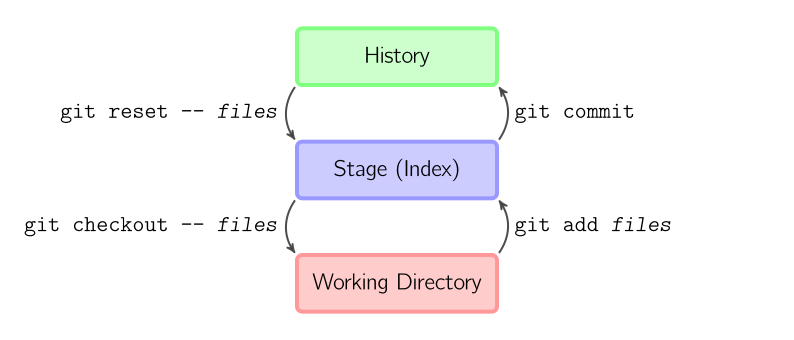
Instead of committing all of the changes you’ve made since the last commit, the stage lets you group related changes into highly focused snapshots before actually committing it to the project history.
This means you can make all sorts of edits to unrelated files, then go back and split them up into logical commits by adding related changes to the stage and commit them piece-by-piece.
As in any revision control system, it’s important to create atomic commits so that it’s easy to track down bugs and revert changes with minimal impact on the rest of the project.
Git commit
The git commitcommand captures a snapshot of the project’s currently staged changes. Committed snapshots can be thought of as “safe” versions of a project — Git will never change them unless you explicitly ask it to. Prior to the execution of git commit, The git add command is used to promote or ‘stage’ changes to the project that will be stored in a commit.
git commit -m 'add(file)'
A shortcut command that immediately creates a commit with a passed commit message. By default, git commit will open up the locally configured text editor, and prompt for a commit message to be entered. Passing the -m option will forgot the text editor prompt in-favor of an inline message.
git commit --amend
This option adds another level of functionality to the commit command. Passing this option will modify the last commit. Instead of creating a new commit, staged changes will be added to the previous commit. This command will open up the system’s configured text editor and prompt to change the previously specified commit message.