Git rebase
Rebasing is the process of moving or combining a sequence of commits to a new base commit. Rebasing is most useful and easily visualized in the context of a feature branching workflow. The general process can be visualized as the following: 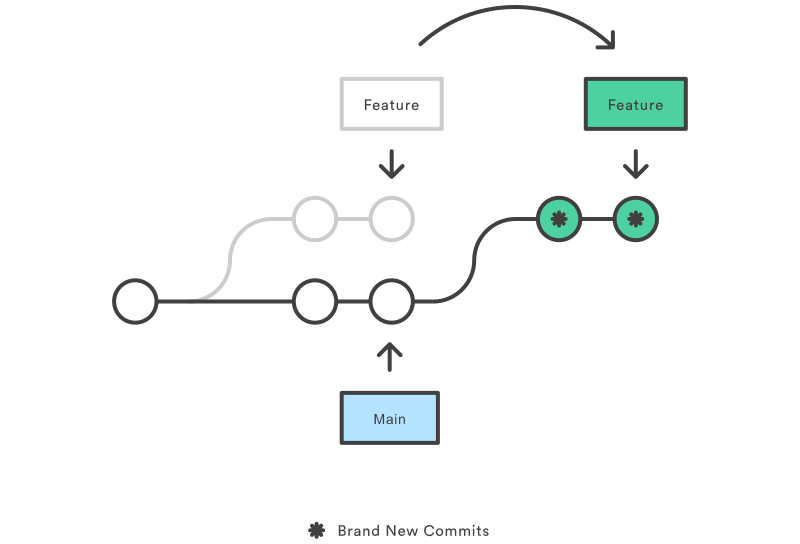
From a content perspective, rebasing is changing the base of your branch from one commit to another making it appear as if you’d created your branch from a different commit. Internally, Git accomplishes this by creating new commits and applying them to the specified base.
Git Rebase Standard
Without any arguments, the command runs in standard mode.
- Let’s say we have a main branch with two commits, and we add two other commits to a new branch:
git init echo "File 1" > a.txt echo "File 2" > b.txt git add a.txt git commit -m 'add file 1' git add b.txt git commit -m 'add file 2' git checkout -b dev echo "File 3" > c.txt echo "File 4" > d.txt git add c.txt git commit -m 'add file 3' git add d.txt git commit -m 'add file 4' - We can now rebase the current
devbranch intomain. We first need to go back tomain:git checkout main - We can now rebase:
$ git rebase dev
Successfully rebased and updated refs/heads/main.
Note that we can rebase a branch, a tag, or even a relative reference of HEAD.
Git rebase interactive
Running git rebase with the -i flag begins an interactive rebasing session. Instead of blindly moving all of the commits to the new base, interactive rebasing gives you the opportunity to alter individual commits in the process. This lets you clean up history by removing, splitting, and altering an existing series of commits.
- Given the same initialisation that was done in the previous example, we can use the command:
git rebase --interactive main
This opens an editor where you can enter commands (described below) for each commit to be rebased. These commands determine how individual commits will be transferred to the new base. You can also reorder the commit listing to change the order of the commits themselves. Once you’ve specified commands for each commit in the rebase, Git will begin playing back commits applying the rebase commands.